
Description
Editoria11y (“editorial accessibility ally”) is a multilingual, automatic, open source accessibility checker that provides live feedback as you work, with site-wide issue reporting and dismissals.
Editoria11y is built around four key needs for ongoing quality assurance, both before and after a site launch:
- Tests run in real-time, offering inline corrections and advice as authors type in CKEditor in Gutenberg.
- It checks rendered content in published pages and previews, allowing it to detect issues that only appear after Drupal assembles the content.
- Tips use plain language, to both correct and teach.
- All data is private. Tests run in-browser, and reports are stored on your own server.
Editoria11y is meant to supplement, not replace, testing with comprehensive tools and real assistive devices.
This plugin is the official WordPress implementation of the open-source Editoria11y library. Tests run in the browser and findings are stored in your own database; nothing is sent to any third party. It is meant to supplement, not replace, testing your code and visual design with developer-focused tools and testing practices.
Project supporters, through code contributions, testing, help translating or purchasing a license, can also enable a developer and auditor tools suite: ~50 additional tests for code and contrast problems, a custom test builder and a site crawler. We are at ~30% of our goal for 2026 support, which should be enough to sponsor work to add a link checker. Check the project roadmap for active projects and ideas for future work.
The authoring experience
Check out a demo of the checker itself.
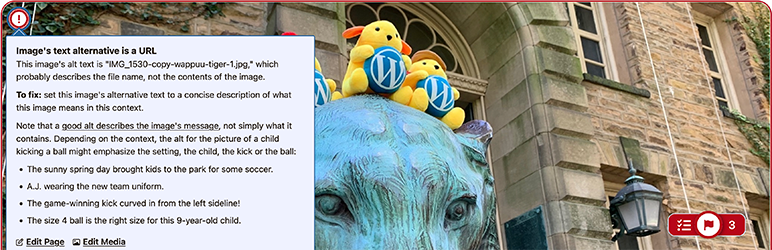
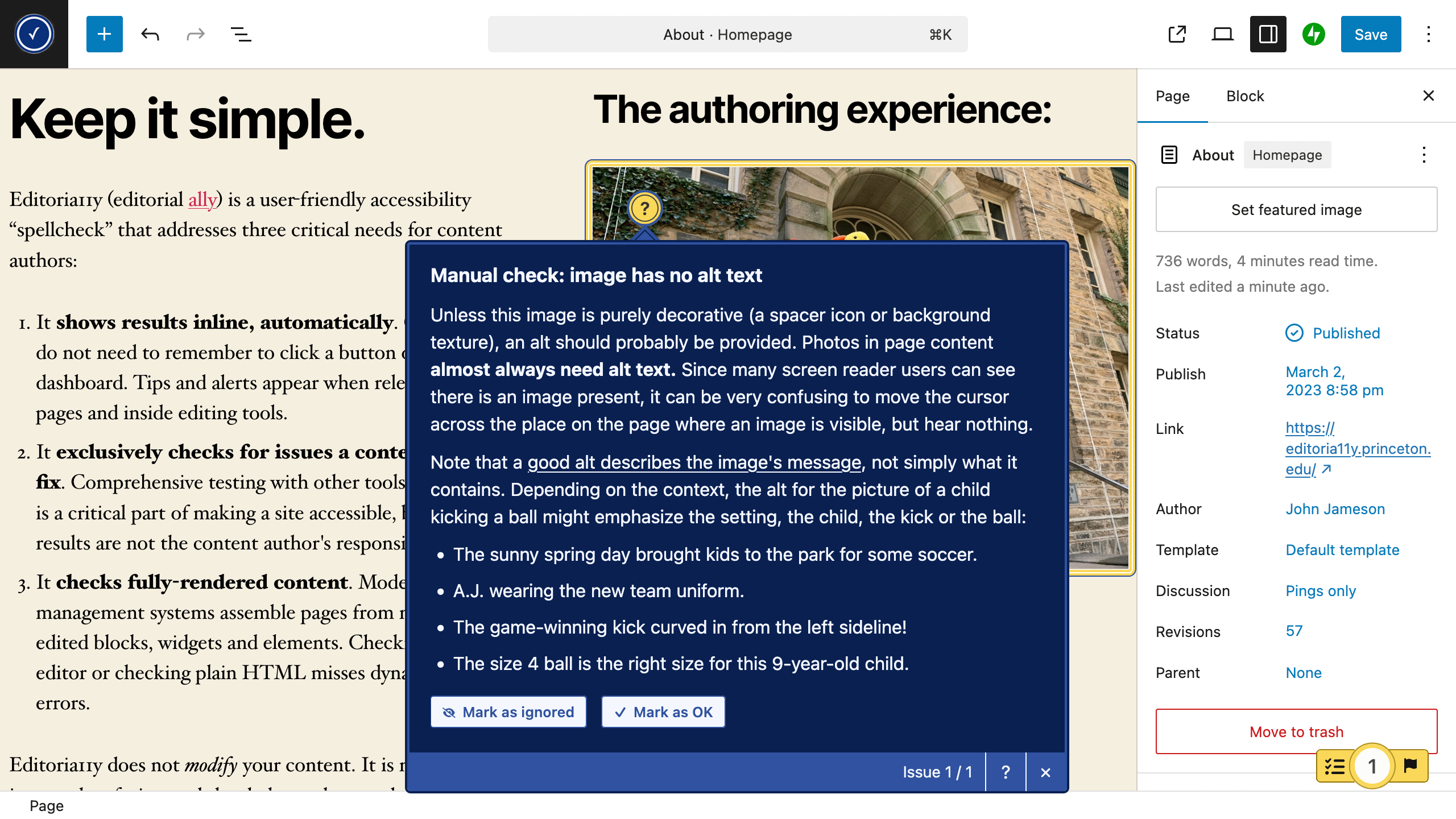
- When logged-in authors and editors are viewing pages, Editoria11y inserts tooltips marking any issues present on the current page. Issues are also highlighted while editing in the Block Editor (Gutenberg) and Classic Editor (TinyMCE).
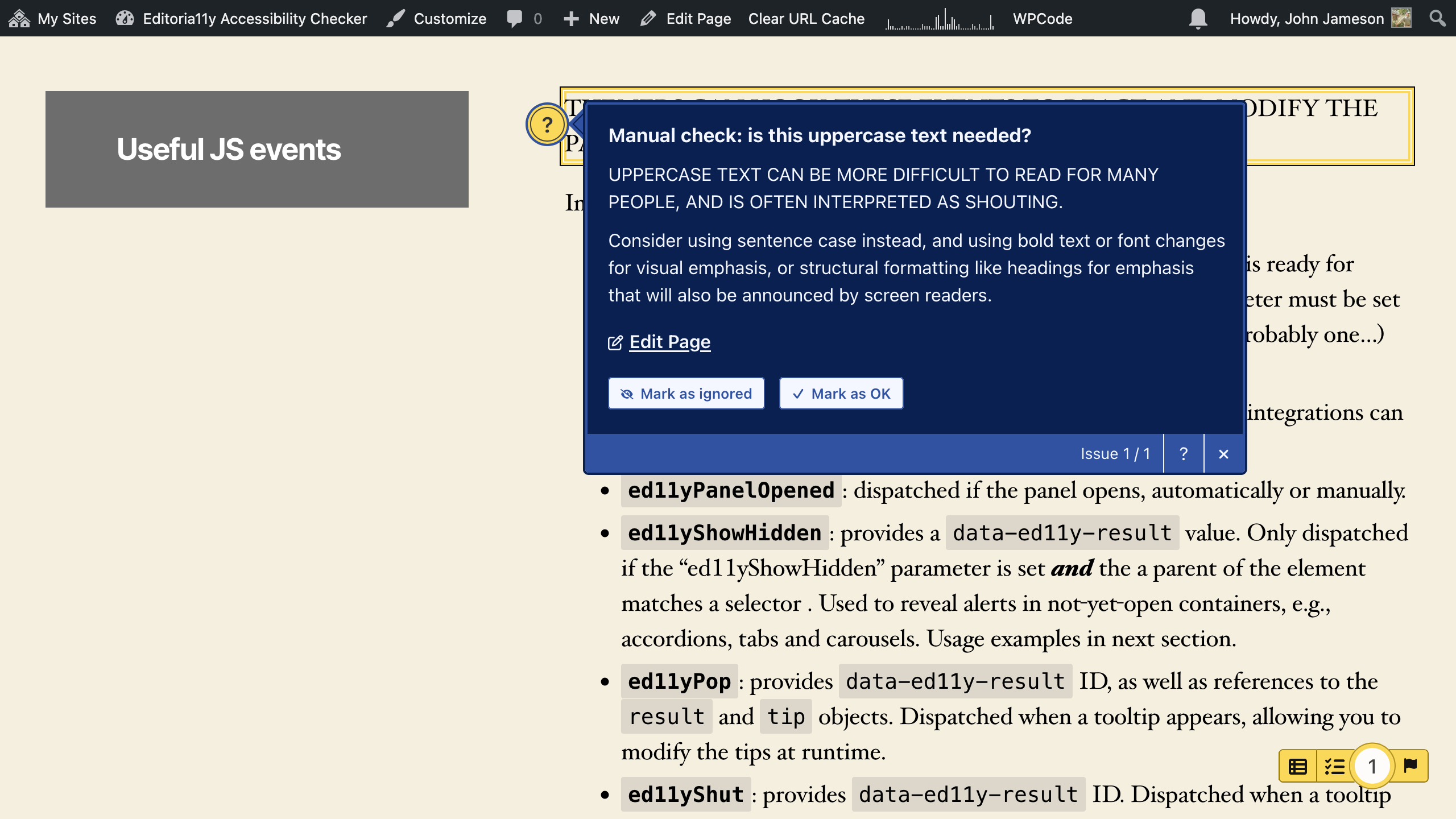
- Tooltips explain each problem and what actions are needed to resolve it. Some issues are “manual checks,” which have buttons to ignore the check or mark the content as OK.
- Clicking the main toggle shows and hides the tooltips.
- The main toggle also allows authors to jump to the next issue, restore previously dismissed alerts, visualize text alternatives for images on the page (“alts”), view the document’s heading outline, and view site-wide detection lists.
The admin experience
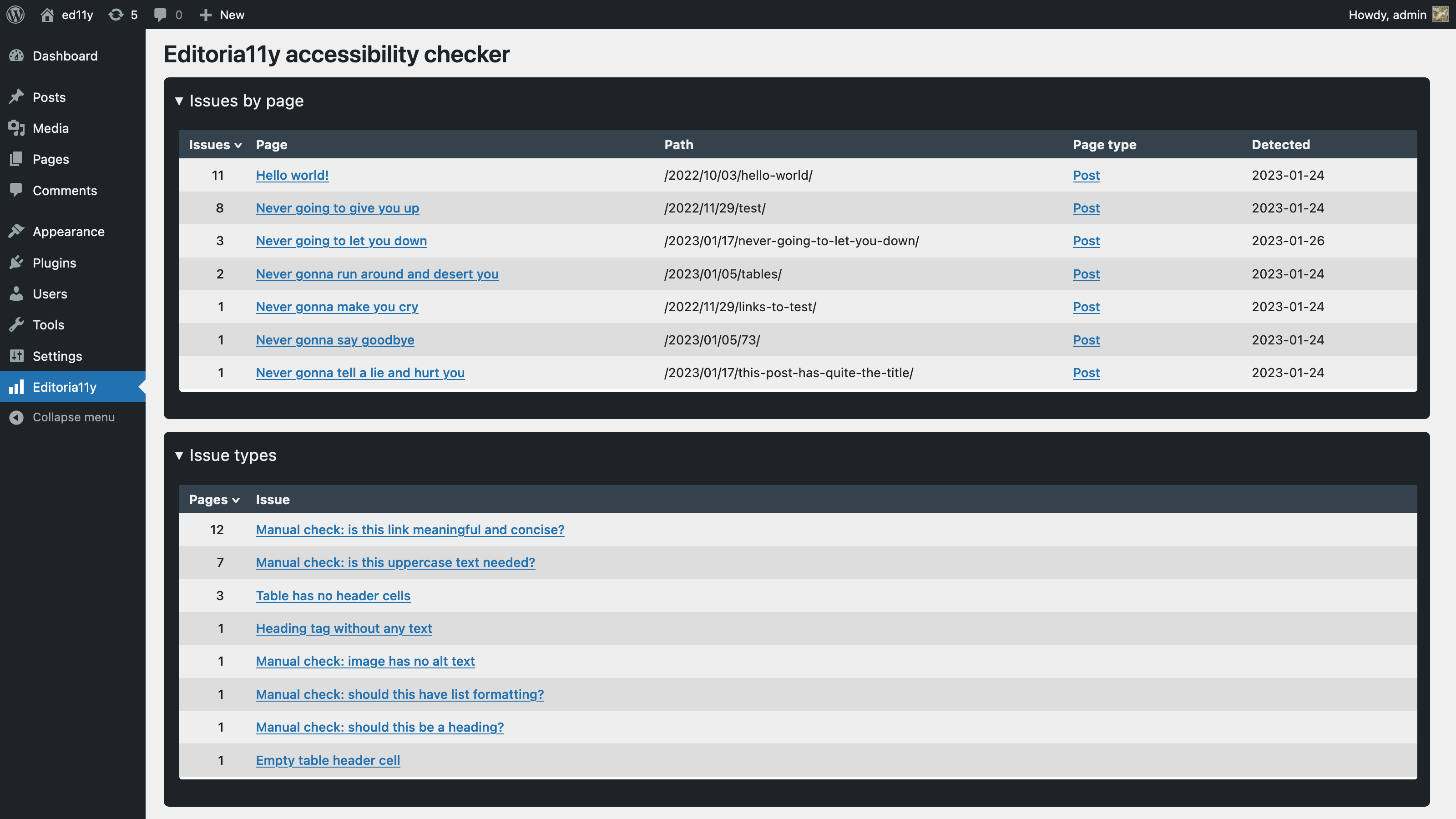
- Filterable reports let you explore recent issues, which pages have the most issues, which issues are most common, and which issues have been dismissed. These populate and update when published content is viewed by logged-in authors.
- Various settings are available to constrain checks to specific parts of the page and tweak the sensitivity of several tests.
The tests
The 50+ content tests include
- Text alternatives for visual content
- Images with no alt text
- Images with a filename as alt text
- Images with very long alt text
- Images with fake alt text to get around field validation (e.g. “TBD”)
- Alt text that contains redundant text like “image of” or “photo of”
- Images in links with alt text that appears to be describing the image instead of the link destination
- Embedded visualizations that usually require a text alternative
- Meaningful links
- Links with no text
- Links titled with a filename
- Links only titled with generic text: “click here,” “learn more,” “download,” etc.
- Links that open in a new window without warning
- Document outline and structure
- Skipped heading levels
- Empty headings
- Very long headings
- Suspiciously short blockquotes that may actually be headings
- All-bold paragraphs with no punctuation that may actually be headings
- Suspicious formatting that should probably be converted to a list (sequences of sentences that start with asterisks, emoji or incrementing numbers/letters)
- Tables without headers
- Empty table header cells
- Tables with document headers (“Header 3”) instead of table headers
- General quality assurance
- LARGE QUANTITIES OF CAPS LOCK TEXT
- Links to PDFs and other documents, reminding the user to test the download for accessibility or provide an alternate, accessible format
- Video embeds, reminding the user to add closed captions
- Audio embeds, reminding the user to provide a transcript
- Social media embeds, reminding the user to provide alt attributes
Is it free?
Yes. Mostly.
Editoria11y promotes accessibility in a unique way. Its tools are highly effective at helping non-technical authors prepare content that can be enjoyed equally by disabled Web users. We consider this a public good, so this plugin, with Editoria11y’s core test suite and reports, is free to use. If you are using an accessible base theme or have a good manual testing workflow and don’t mess with colors in the block editor, that should be all you need.
Editoria11y is not, however, free to develop or support, so quality assurance features for developers and auditors ask for a CSA subscription, via a “contribute what you can” model, with free tiers for active code, testing and translation contributors. We do not want financial limitations to prevent anyone from using any of the accessibility testing features, so contact us if the lowest support tier would present an undue burden and you are not able to contribute in another way.
Supporter tools
Editoria11y CSA (“Community Supported Add-ons”) membership provides ~50 additional tests, as well as broad quality assurance tools for site owners:
- Developer and contrast tests.
- Role-based split configuration, allowing developers and content creators to check different parts of the page and apply different tests.
- A custom-test builder.
- One-click, site-wide dismissals.
- A site crawler to refresh the site-wide reports after major site changes, to save having to manually click through the menus.
Examples of developer tests in the CSA submodule:
- Broken in-page anchor link
- Duplicate ID attribute
- Text has insufficient contrast
- Button has no accessible label
- Button label includes the word “button”
- Visible label doesn’t match accessible name
- Input has no associated label
- Input uses only an invisible label
- Input uses only a placeholder as a label
- Element hidden from screen readers but still keyboard-focusable
- Positive tabindex breaks reading and tab order
- Page title missing
- Page language not declared
- Viewport prevents text scaling
Credit
Editoria11y’s WordPress plugin was created by Princeton University’s Web Development Services team:
- John Jameson: Editoria11y JS and CMS integrations
- Jason Partyka: Devops
- Brian Osborne: Code review
- Michael Muzzie: Wapuu photos
Editoria11y’s core test suite is co-maintained code with Toronto Metropolitan University’s Sa11y Accessibility Checker.
New feature development comes through by grants from academic institutions and companies, as well as direct contributions from project users through Editoria11y CSA subscriptions.
Screenshots

Installation
Editoria11y’s default settings will work great for most sites.
Your first task after installation should be clicking through a representative sampling of the main pages of your site. This will start to populate your dashboard report, and give you a chance to look for issues to fix or dismiss.
If you notice anything amiss, experiment with these settings:
- If the checker is flagging issues that are not relevant to content editors, either use “Check content in these containers” to constrain checks to the parts of the page with editable content, or “Exclude these elements from checks” to skip over certain elements, regions or widgets.
- Editoria11y also provides an “as-you-type” issue highlighter that works inside the editor. If you find live correction annoying rather than helpful, change “Check while editing content” to unset “always show tips,” or chose “Do not check while editing.”
- Turn off tests that are not helpful or compatible with your theme.
- If your theme has done something very unusual with its layout, such as setting the height of the content container to 0px, you may see confusing alerts when opening Editoria11y tips saying that the highlighted element may be off-screen or invisible. If that happens, disable “Check if elements are visible when using panel navigation buttons.” This is disabled by defaults on any WordPress themes we have noticed this on, so if you find another theme that needs this turned off, contact us!
If you are a theme developer, note that the library dispatches JavaScript events at several key moments (scan finishes, panel opens, tooltip opens or shuts), allowing you to attach custom functionality. JavaScript on sites running Editoria11y can use these events to do things like automatically opening accordion widgets if they contain hidden alerts, disabling “sticky” site menus if the panel is open, inserting custom results, or syncing results to third-party dashboards.
And then…tell us how it went! This plugin and its base library are both under active development. Ideally send bug reports and feature requests through the GitHub issue queue.
FAQ
-
How is this different from other checkers?
-
Editoria11y is…spellcheck: a seamless, automatic and intuitive integration for content authoring. It:
- Does not require training before use.
- Displays results inline
- Checks live while you type
- Eschews obfuscation and techno-legal jargon. It explains what the issue is in plain language, with a simple explanation of how to fix it. “This image needs alternative text” with a short explanation of what alternative text is makes sense without prior technical knowledge; “Failure of WCAG 1.1.1 Level A: Non-text Content” does not.
- Deliberately excludes (or splits by role) tests for theme and plugin issues, like invalid HTML tags and ARIA attributes. Testing is critically important for themers and developers, but it is work for themers and developers, not content editors. For ongoing quality assurance, Editoria11y provides people with a tool that fits their role, so they only receive alerts for things they can fix.
Most other tools check on crawl, often weeks or months later, asking you to remember to visit a dashboard with a complex interface.
Note that this is a difference, not a clear superiority: crawler tools have access to much more processing power than an inline checker, which lets them run more obscure and complex tests, and monitor non-WordPress sites. Many Editoria11y users also pay for a crawler for annual, cross-site trend monitoring.
-
How is this different from Sa11y?
-
The Editoria11y and Sa11y maintainers co-develop their test suite, so the backend testing library is actually identical.
The look, feel and features are quite different, though. At a high level:
- Sa11y for WordPress provides a simple plugin wrapper:
- Tests are per-page; there are no site reports.
- Tests only display on view/preview, not while editing.
- Dismissals are individual; there is no dismissal sync API.
- All tests are enabled for all users — that means more tests at a free tier, but also means content editors see developer errors.
- The roadmap is effectively complete: new tests will be added as we expand the library, but server-side features are not planned.
- Editoria11y for WordPress provides extensive WordPress integration
- Editors receive feedback as they type, while editing.
- Findings are synchronized to a site-wide reporting dashboard.
- Manual-checks marked as “OK” are dismissed for all users.
- Multisite network management allows propagation of both site defaults and site overrides.
- CSA members have a custom test wizard.
- CSA members have a crawler.
- CSA members can split tests by role.
- Funding from the CSA project means the roadmap includes many new features: link checking, PDF checking, preflight checkpoints, score and score history, multisite monitoring are likely to land in 2026 and 2027.
- Sa11y for WordPress provides a simple plugin wrapper:
-
Is this an overlay?
-
Overlays are scripts that make untested modifications to your site’s themes and content, claiming these automated changes will better meet the accessibility needs of your users. Overlays may do things like override your theme’s font sizes or colors, or modify its heading tags and buttons. This differs from buttons that make potentially the exact same changes to a specific site — the key difference is in whether the button has been tested with that specific theme, or attempts to work in any context without testing.
You should familiarize yourself with the assistive technology compatibility problems untested overlays may introduce before assuming these changes will be helpful, as any untested code can break existing accessibility features or introduce new invisible errors. If you choose to install an overlay, you should test each of its features on your site using assistive tools or pay for a professional accessibility test.
Editoria11y is not an overlay. It does not modify the site viewed by not-logged-in-users in any way. It is an editor-facing testing tool that helps your site editors create accessible content that does not need an overlay.
Reviews


Contributors & Developers
“Editoria11y Accessibility Checker” is open source software. The following people have contributed to this plugin.
Contributors


Translate “Editoria11y Accessibility Checker” into your language.
Interested in development?
Browse the code, check out the SVN repository, or subscribe to the development log by RSS.
Changelog
3.0.1
- Allows dismissing certain manual checks site-wide (PDF alternatives, video captioning and developer tests outside the content area).
3.0.0
- Adds many new content editor tests and translations.
- Adds robust multisite configuration management, both for pushing and overriding settings across a network and for setting defaults for newly created sites.
- Adds a supporter tier with developer tests, a custom test builder, role-based split configuration (who sees which test) and a crawler.
2.1.13
- Add hooks for modifying CSV exports.