

Description
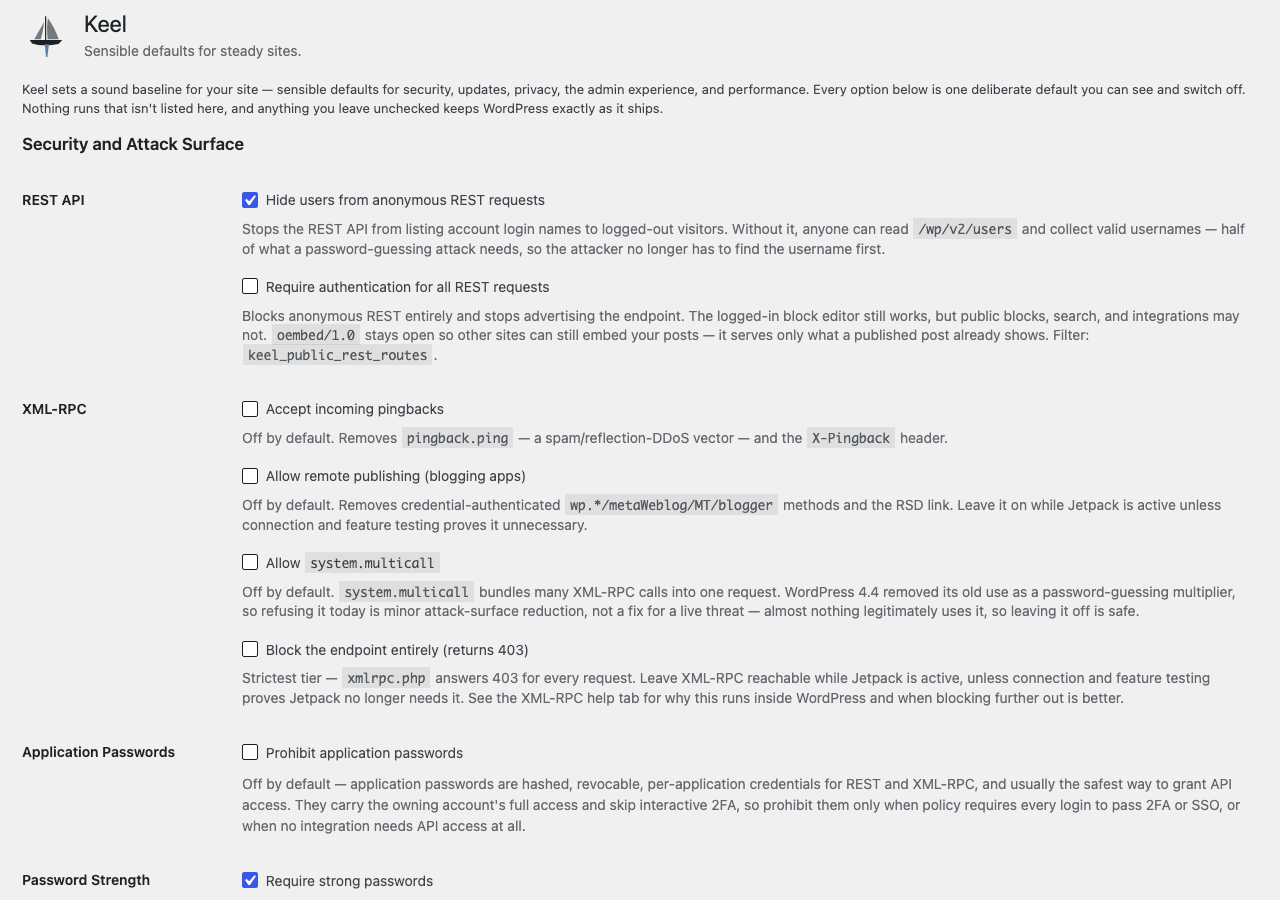
Keel flips a menu of sensible defaults onto any WordPress install, each one a switch under Settings Keel. Nothing is hidden and nothing is all-or-nothing — you can see exactly what the plugin does to your site and turn any piece off.
All 39 defaults are declared in a single schema array that drives both the settings screen and the code that wires them to WordPress. A default is an opinionated filter behind a control.
Disabling something means it is actually disabled. When you switch comments off, they are off below the presentation layer, not merely hidden by the theme template and the REST route — ask the database directly with get_comments() and there is nothing to hand back. The same care runs through the rest: closing the REST API also removes the link advertising it, and disabling comments also stops the comment feed answering.
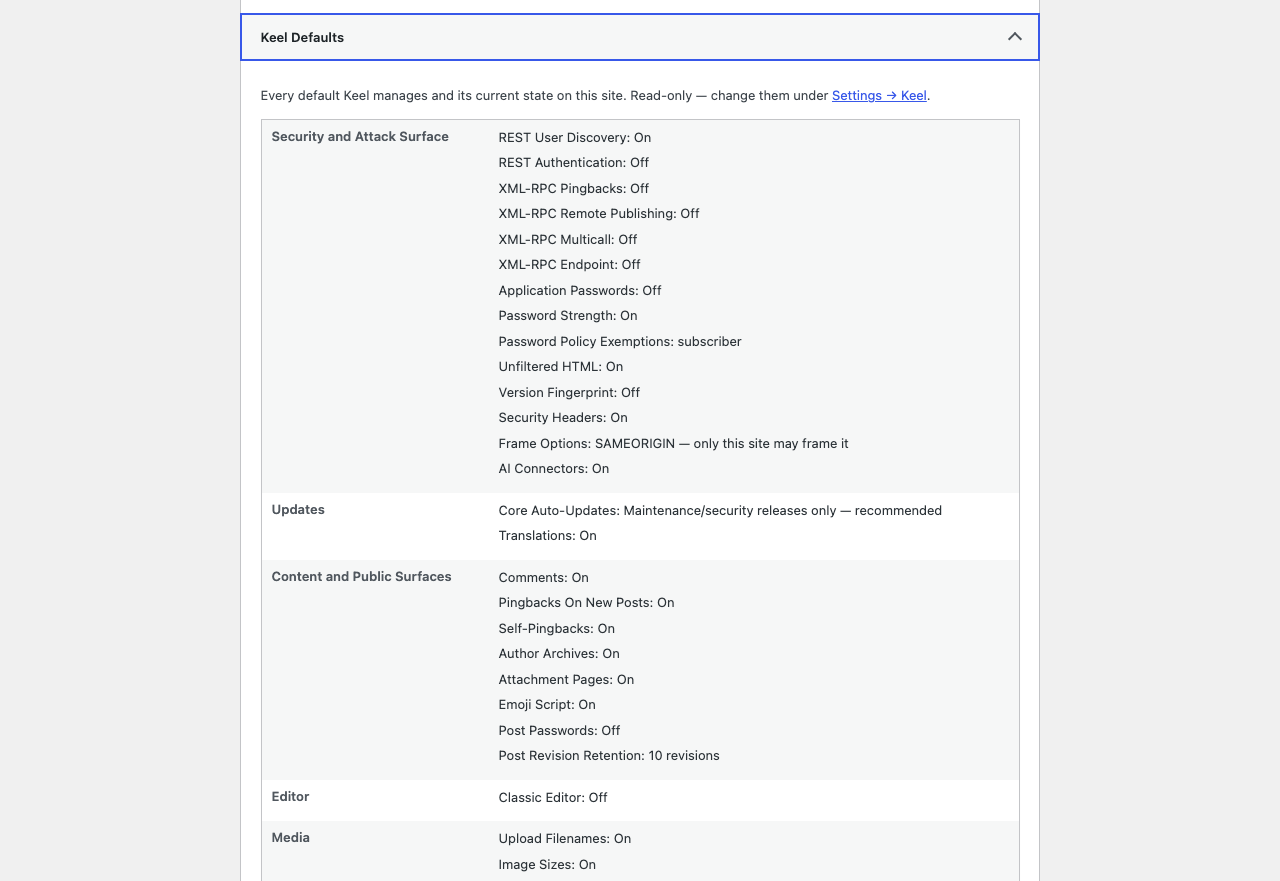
Site Health shows you the whole posture, read-only: every default and its current state on one screen, so you can see what the site is actually doing without clicking through tabs. It also reports when another plugin is controlling the same settings, which otherwise fails silently.
Outgoing email stops at the edge of production. A database copied down from production carries real customer addresses and whatever mail service production was using, so a cron run or a bulk action can email real people from a staging site or a laptop. Keel suppresses outgoing mail on any environment that is not production — on by default, does nothing on production, and says so in an admin notice so nobody is left wondering why a password reset never arrived.
It works the same on a network. Activated across multisite, Keel seeds every existing site and every site created afterwards, so a later change to a default cannot move some sites and not others. A Super Admin can decide any setting for the whole network under Network Admin Settings Keel Defaults; sites see those settings as locked, with their own saved values untouched underneath, so lifting a policy returns each site to exactly what it had.
External services
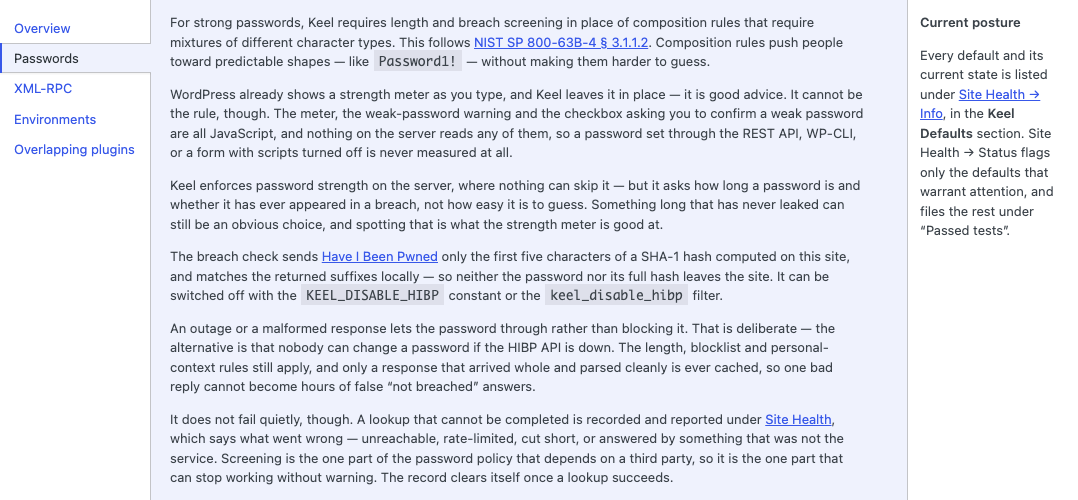
When the Require strong passwords default is enabled, Keel screens new passwords against the Have I Been Pwned Pwned Passwords range API (https://api.pwnedpasswords.com) to reject passwords found in known breaches. This uses k-anonymity: only the first five characters of the password’s SHA-1 hash are ever sent — never the password, and never the full hash. No personal data is transmitted. The check runs only when a password is being set or changed and the default is on. It can be disabled with define( 'KEEL_DISABLE_HIBP', true ); in wp-config.php, with the keel_disable_hibp filter, or by turning off the strong-password default. If the API is unreachable, or answers with a truncated or malformed response, the check is skipped and the password is allowed — a breach-data outage never blocks a password change. It is not skipped silently: the failure is recorded and reported under Site Health, so a site whose screening has stopped working can tell. Only the kind of failure and when it happened are stored — never the password, and never the hash prefix. Have I Been Pwned is operated by Troy Hunt; see https://haveibeenpwned.com/Privacy and https://haveibeenpwned.com/API/v3 for its terms and privacy policy.
Recommended wp-config.php hardening
A few defences live best in wp-config.php, outside any plugin: they apply before plugins load and cannot be switched off from the dashboard. These are optional and independent of Keel — add the ones that fit your site.
define( 'DISALLOW_FILE_EDIT', true ); — removes the built-in plugin and theme code editors, so a compromised admin account cannot edit PHP from the dashboard.

define( 'WP_POST_REVISIONS', 10 ); — caps stored post revisions so the database does not grow without bound. Keel's **Post Revision Retention** control can govern the same policy after plugins load; a numeric or false constant remains the higher-level operator choice and locks that control.

define( 'AUTOSAVE_INTERVAL', 120 ); — lengthens the editor autosave interval. This is independent of Keel's Heartbeat throttle: both influence how often the editor saves in the background, but neither replaces or overrides the other.<h3>Credits</h3>
Keel is a de-branded evolution of Better by Default, the WordPress defaults plugin by WPYEG (the Edmonton WordPress meetup): https://github.com/WPYEG/Better-by-Default
Better by Default is published under the GPL-3.0-or-later; its sole author, who also wrote Keel, additionally licenses the portions carried over here under the GPL-2.0-or-later. Keel keeps Better by Default’s core architecture — a single schema array that drives both the settings screen and the bootstrap, where each default is one array entry plus one hook — and adds further hardening and admin defaults adapted from the Pixel Managed Platform plugin (GPL-2.0-or-later).
Pixel Managed Platform is itself a hard fork of the 10up Experience plugin by 10up (GPL-2.0-or-later): https://github.com/10up/10up-experience — so several of Keel’s adapted defaults ultimately descend from code first written for 10up Experience. Copyright in that work is retained by 10up and its contributors, and 10up retains its marks; Keel is not affiliated with or endorsed by 10up. See LICENSE for the full GPL-2.0 text.
Support This Plugin
Keel is free and stays free. If it saves you an afternoon of hardening a new site, or keeps a staging server from emailing your client’s customers, you can support its maintenance through GitHub Sponsors.
Bug reports and feature requests are welcome on the issue tracker: https://github.com/dknauss/keel/issues. If you have found a security problem, please report it privately rather than in a public issue — SECURITY.md ships with the plugin and says how.
Screenshots
Installation
- Copy the plugin folder into
wp-content/plugins/, or upload the built zip through Plugins Add New Upload Plugin. - Activate it. The documented defaults are seeded on activation; nothing is applied before that.
- Visit Settings Keel and turn off anything you do not want.
Every default is a switch, and the switches are the whole interface. Defaults that can change behaviour or break an integration — requiring authentication for all REST requests, blocking the XML-RPC endpoint, the Classic editor — are off out of the box and opt-in.
There is one exception: Keel sends an X-Frame-Options header of SAMEORIGIN, so other sites cannot embed yours in an iframe. If something else is meant to display this site inside a frame — an intranet dashboard, a screenshot or visual-review service, a kiosk or signage screen — set Frame options to “Leave unchanged” under Security and Attack Surface. A blocked frame usually fails silently, as a blank box.
Deactivating stops every default at once; stored settings are kept so reactivating restores the same configuration. Uninstalling removes them.
FAQ
-
What changes when I activate it?
-
Sixteen of the thirty-nine defaults are on out of the box, and nine more settings that are not simple switches apply a starting value. Nothing is written to your content and nothing is deleted; every one of them is a switch on Settings Keel you can turn off, and turning it off puts WordPress back exactly as it shipped.
Most of it is quiet. Users stop being listed to anonymous REST requests, new passwords have to be long and must not appear in a known breach, raw HTML and JavaScript are limited to Administrators, baseline security headers are sent, AI provider connectors are switched off, translations keep auto-updating, uploads get lowercase filenames, attachment screens show which image sizes were generated, and the site warns you if its own email looks misconfigured.
Three are visible straight away and are the ones to know about. Comments, trackbacks and pingbacks are switched off everywhere, including for existing posts — nothing is deleted, and turning the setting off brings every comment back. Author archives stop resolving, so
/author/name/no longer returns a page. AndX-Frame-Options: SAMEORIGINis sent, which stops other sites displaying yours in an iframe; if something is meant to embed this site, set Frame options to “Leave unchanged”.Two more change things you may not see immediately: attachment pages redirect to the parent post, and self-pingbacks and the emoji detection script are gone.
The starting values are conservative. Core auto-updates are set to minor — maintenance and security releases install themselves, major versions do not — ten post revisions are kept, logins last two days or fourteen with “Remember me”, and subscribers are exempt from the password rules. The admin menu width, the front-end admin bar and the login logo are all left as WordPress has them until you choose otherwise.
One default is on but does nothing on a live site: outgoing email is blocked on any environment that is not production, so a database copied to staging or a laptop cannot email real people. On production it never acts.
-
Will this break my site?
-
The defaults that are on out of the box are low-risk, with one exception worth naming:
X-Frame-Options: SAMEORIGINis sent by default, and it stops other sites embedding yours in an iframe. Set Frame options to “Leave unchanged” if the site is meant to be embedded, because a blocked frame fails silently as a blank box.Everything else that can break something is off and opt-in, and each says on the settings screen what it will cost you — for example that blocking the XML-RPC endpoint also stops apps and services that publish through it. Requiring authentication for REST is the one place Keel spends a little of that strictness back:
oembed/1.0stays reachable, so other sites can still embed your posts when every other route is closed. -
Does it send anything off my site?
-
One thing, and only when the strong-password default is on: the first five characters of a password’s SHA-1 hash, to check it against known breaches. Never the password, never the full hash, no personal data. See External services above for the full description and how to switch it off.
-
Why has email stopped working on my staging site?
-
Because Keel switched it off, deliberately, and there is an admin notice on the site saying so. The Non-Production Email default suppresses outgoing mail on any environment that is not production, so a database copied down from production cannot email real customers from a staging site or a laptop.
It does nothing on production, so it cannot be left on by mistake. To send from a non-production site anyway, turn the default off under Settings Keel, define
KEEL_ALLOW_NONPRODUCTION_MAILinwp-config.php, or use thekeel_suppress_nonproduction_mailfilter. A mail catcher can still record what would have been sent by hookingkeel_outgoing_mail_suppressed.The environment is read the same way the admin-bar environment indicator reads it:
WP_ENVIRONMENT_TYPE, whether set as a constant or an environment variable, and a host-name fallback for local development tools when neither is set. -
Does it delete anything?
-
No. Disabling comments hides them and closes the forms; nothing is removed from the database, and turning the default off brings every comment back. The same holds for the other content defaults.
-
Can I set these in code instead?
-
Yes. Every default reads its value through the plugin’s own option, and the behaviours are filterable —
keel_weak_roles,keel_disable_hibp,keel_comment_blocks,keel_allowed_comment_typesand others. Awp-config.phpconstant always wins over the settings screen where one applies; the screen says so when it is being overridden. -
I run multisite. Does the password policy apply per site?
-
The setting is stored per site; the effect is not. WordPress keeps one user table for the whole network, so a password is checked against whichever site it is being set on — and once set, it is that person’s password everywhere. Exempting a role on one subsite decides what happens when a password is changed there; it does not exempt those accounts from another site’s policy. In practice the strictest site on the network sets the floor for anyone who changes their password on it.
Keel can now govern it as well as document it. Under Network Admin Settings Keel Defaults, a Super Admin can decide any setting for the whole network; sites see it as locked and cannot change it. Tick the password rules there and the network has one policy instead of a floor set by whichever site is strictest.
Nothing is written into your sites. A network value is applied when a setting is read, so a site’s own saved settings are untouched — untick a setting later and every site returns to exactly the value it had. Settings left unticked stay each site’s own business.
-
I already have another defaults or security plugin. Can I run both?
-
You can, but you probably should not, and Keel will tell you when it matters.
Some settings are applied through WordPress filters that transform a value in priority order — session length is the clearest example. Another callback on the same filter does not prove a conflict: two plugins may reach the same outcome or govern different parts of a structured result.
Keel reports a structural overlap only when it is registered on an authoritative policy hook and a callback attributable to another active plugin is registered there too. It never executes the other plugin’s callback to diagnose the overlap. The notice appears on the Plugins screen, on Settings Keel, and on the dashboard, where it can be dismissed until the overlap changes. The full detail is under Tools Site Health.
That evidence confirms shared ownership of a hook, not that the plugins’ configured outcomes disagree. Keel asks you to compare their settings and never recommends deactivation from callback presence alone. Mail, authentication, comment-query, capability, and unattributable overlaps stay unconfirmed and informational.
There is a limit worth knowing. WordPress ships tiny helper callbacks such as
__return_false; the callback belongs to WordPress, not the plugin that registered it. Keel labels that limitation unconfirmed instead of guessing from source code or naming a plugin without evidence.Keel also stays out of the fight where it has nothing to say: when a setting is still at the value WordPress itself uses, Keel does not register the filter at all, so it cannot override a deliberate choice another plugin has made — and it will not report a conflict on a setting it is not itself setting.
-
Why is there no password strength meter?
-
WordPress ships one, but it is JavaScript: it advises the person typing and cannot refuse anything, so a password set over the REST API, WP-CLI, or a form with scripts disabled never meets it. Keel enforces length, breach screening, a blocklist and a personal-context check server-side instead, where they cannot be bypassed. See the Help tab on the settings screen.
Reviews
There are no reviews for this plugin.
Contributors & Developers
“Keel Defaults” is open source software. The following people have contributed to this plugin.
Contributors
Translate “Keel Defaults” into your language.
Interested in development?
Browse the code, check out the SVN repository, or subscribe to the development log by RSS.
Changelog
Versions before 0.5.9 were not published to the directory. The entries below are the development history that led to the first release.
0.5.9
- Breach-cache entries can no longer be reached again after the plugin is removed and reinstalled. On a site with Redis or Memcached, WordPress keeps transients in the object cache rather than the database, where the uninstaller’s queries cannot follow them. Each installation now has its own cache namespace, so anything left behind belongs to an installation that no longer exists.
- Rewrote the Help menu’s Environments and Overlapping plugins tabs, and corrected how the environment type is described: WordPress reads the
WP_ENVIRONMENT_TYPEconstant andwp_get_environment_type()reports the result, not the other way round.
0.5.8
- Header names, constants and file names in the Help menu are shown as code again rather than as running text. Three paragraphs across two tabs had lost the formatting the rest of the help uses.
0.5.7
- Breach-screening reports are now based on evidence rather than the absence of it. A successful lookup clears an earlier failure, which it did not before — so a site that recovered kept being told it had a problem, against the notice’s own promise. Site Health also distinguishes “the last lookup completed” from “nothing has ever run here”, and notices when the lookup has been switched off with the filter rather than only the constant.
- Grouped settings that depend on another setting now show and hide as you change it. The three XML-RPC method controls were the only settings rendered inside a group, and the script that reveals dependent settings only looked at ungrouped ones — so those three stayed as they were until the page reloaded, and never announced the relationship to a screen reader.
- Network-locked sliders and role checkboxes now behave as locked. They said they were locked and then accepted edits anyway. The server always refused the value; now the screen agrees with it.
- Deleting the plugin clears breach-cache data held in a persistent object cache. On a site with an external cache the cached hash prefixes were not database rows at all, so they outlived the plugin by up to twelve hours.
- Tightened the check that removes the settings option from before the rename. It deleted any stored array carrying one of five fairly ordinary keys, which could have taken an unrelated option with it.
0.5.6
- Breach screening now says when it is not working. If the Have I Been Pwned lookup cannot be completed — the service is unreachable, rate-limiting, or something else answered in its place — Site Health reports it instead of the check being skipped in silence. Passwords are still never blocked by an outage, and the rest of the password policy is unaffected; the difference is that a site whose screening stopped working weeks ago can now find out.
- Added help for environments and for overlapping plugins. The Help menu on the settings screen explains why email stops on staging, what the environment indicator is for, and what the two kinds of overlap report actually mean — including why some overlaps name a plugin and some cannot.
0.5.5
- Fixed a confusing conflict report. Where a callback could not be traced back to a plugin, Site Health said “callbacks from Unattributed callback” — which reads as the name of a plugin, and several such lines read as several plugins, none of them the one the notice had actually named. It now says a callback could not be traced to a plugin, and the notice accounts for those settings too, so the two screens agree.
0.5.4
- A setting that is not taking effect now says so where you will see it. Keel could already detect that something else on the site was overriding one of its settings, but it reported that only under Site Health — which nobody opens until something has already gone wrong. It now appears on the dashboard and the plugins screen, which is where the overlap warnings already were. This is the case you most need telling about, because a plugin that switches a feature off using one of WordPress’s own helper functions leaves nothing to name it by.
- Fixed a comments heading appearing on posts with comments switched off. Keel reported the count as the number zero where WordPress reports it as the text “0”, and core’s Comments Title block compares the two exactly — so it did not take its early return. Affected block themes, which is the default.
- Pingbacks are now watched for the same override as comments. Both are decided by the same setting and were registered together, but only comments was checked.
0.5.3
- Fixed the login screen’s logo link. Removing, unlinking or replacing the logo is supposed to point that link at your site’s home page; it pointed at your home page with
https://wordpress.org/appended, which goes nowhere. Affected every site with any of those three behaviours set. - Keel can now see another plugin that switches the same setting off in the same way it does. WordPress stores one entry per callback, so when two plugins register the identical callback at the identical priority the second replaces the first and only one remains — which meant a plugin doing exactly what Keel does could be reported as Keel’s own registration, or hide Keel’s. Keel now uses callbacks that are its alone, so both are always visible and the report can tell them apart.
- Every stylesheet and script Keel adds now goes through the WordPress asset API instead of being written straight into the page. Nothing changes on screen. It means a site can dequeue, override, or defer any of it by handle, and that caching and asset-optimizing plugins can see it — none of which was possible while the markup was printed directly.
- The settings screen’s CSS and JavaScript are now static files rather than markup rebuilt on every page load, so a browser caches them. The admin-menu-width slider carries its labels and widths as data attributes, which also makes its script work for any number of sliders rather than being re-emitted once per field.
- The network policy screen and the per-site settings screen now share one copy of the script that refuses changes to a locked control. There were two, and they had already drifted apart.
- Deleting the plugin now also removes the settings option from before the rename, which a site that had run both the older plugin and this one kept as an orphaned autoloaded row. Deleting from the Plugins screen left it behind, because nothing in the current code refers to that name any more.
- Dropped the compiled Canadian English translation from the plugin package. Translations for every locale are generated and delivered by translate.wordpress.org; shipping a catalog alongside that only means two sources for the same strings.
0.5.2
- Fixed a setting being switched off by saving a different one. On WordPress 6.4 to 6.9 the AI Connectors control is not shown, because those versions have no AI connectors to turn off — but saving any other setting still read the missing checkbox as “off” and rewrote the stored value from on to off. Silently, and against a note in 0.4.0 saying the stored value was left alone. A site that had chosen to block connectors would have reached WordPress 7.0 with them enabled.
- A setting the screen does not show is no longer changed by saving the screen. This is the same protection settings locked by
wp-config.phpalready had, for the same reason: the form has no business speaking for a control it did not draw. - Network Admin no longer offers a network-wide policy for a feature the running WordPress does not have, and an existing policy for one survives a save rather than being read as switched off.
- The Network Admin role list shows role names again rather than their internal slugs, and no longer emits a PHP notice for each one.
- A plugin that only removes entries from the block inserter is no longer reported as competing with Keel. Two plugins restricting which blocks are available both get their way, so reporting a collision there suggested deactivating a plugin that works alongside this one.
0.5.1
- Removed effect probes from policy-overlap detection. Diagnostics no longer execute another plugin’s callbacks with synthetic or real user/post context, so reporting an overlap cannot send mail, write data, terminate the request, mutate hooks, or trigger other callback side effects.
- Restored structural detection on authoritative hooks: Keel must be registered on the hook and the other callback must be attributable to an active plugin. The report confirms shared ownership only, tells administrators to compare settings, and does not recommend deactivation from presence alone.
- Memoized the overlap report for each request and added adversarial coverage for mutating, throwing, and terminating callbacks, plus guards against hook-registry mutation and overstated UI copy.
0.5.0
- Added post-revision retention: new activations keep 10 revisions, existing sites preserve their previous unlimited behavior on upgrade,
-1means unlimited, and0disables future revisions. Numeric or falseWP_POST_REVISIONSpolicy locks both site and network controls. - Author feeds now return an explicit 404 when author archives are disabled. They were already closed by the archive’s broad 301 because WordPress sets both query flags; the corrected test now proves that routing fact against the real request.
- Rebuilt overlapping-policy detection around confirmed, compatible, and unconfirmed effects. Callback presence alone no longer generates deactivation advice, and the incorrect claim that mail/comment-query callbacks stop after the first non-null value is gone.
0.4.1
- Removed the unconfirmed half of the overlapping-settings check. It reported a plugin when something untraceable was registered on a setting Keel also sets and that plugin’s source mentioned the same filter — but WordPress itself, and Keel itself, both register through the same untraceable helper functions, so the first of those two conditions was true on nearly every setting. That left one weak signal doing the work of two, and it named plugins that were not doing anything: Clearfy and WP Master Toolkit were both reported on five settings between them while registering nothing at all. Confirmed detection is unchanged and unaffected.
- The check now says what it cannot see, on the settings screen and in Site Health. A plugin that turns something off by handing one of WordPress’s own helper functions to a filter cannot be traced back from that filter, so a clear result means nothing traceable was found rather than nothing competing.
0.4.0
- The plugin folder is now
keel-defaultsrather thankeel, and the text domain moved with it. WordPress.org serves translations as{slug}-{locale}.mo, so a text domain that is not the slug means no translation ever loads — silently, with nothing to search for. - Keel now tells you when another plugin is setting the same things it is. Session length, comment behaviour, the editor and a dozen other settings are applied through WordPress filters that return a single value: when more than one plugin uses the same filter, only one of them takes effect, there is no error, and the ones that lost go on showing the values they set. The check names the plugins and the settings — on the Plugins screen, on Keel’s own screen, and in full under Site Health.
- What it cannot see is stated where it is reported. A plugin that turns a feature off by handing one of WordPress’s own helper functions to a filter leaves nothing to trace back to it, so a clear result means nothing traceable was found rather than nothing competing.
- A conflict needs Keel to be on the hook too. Turning a default off takes Keel out of the contest and the report follows, instead of warning about a setting Keel has stopped touching.
- Capability conflicts are judged by the capability rather than by the filter. Nearly every plugin that adds a custom role uses the same filter Keel uses to take
unfiltered_htmlaway, and almost none of them touch that capability; only the ones that do are reported. - AI Connectors no longer appears on WordPress versions that have no AI connectors. The setting is gated on the core function rather than a version number, and its stored value is left alone, so a site that upgrades to 7.0 finds the default already there.
- Tested against WordPress 7.1, behaviourally rather than by reading the release notes.
0.3.0
- Multisite: a Super Admin can decide any setting for the whole network, under Network Admin Settings Keel Defaults. Sites see those settings as locked. Policy applies when a value is read rather than being written into each site, so a site’s own saved settings are untouched and lifting the policy returns every site to exactly what it had.
- A locked setting now stays locked when the form is saved, not only when it is drawn. A wp-config constant or a network policy was enforced in the rendered control and nowhere else, so a submission could still write the value it protected. It never took effect, but the stored setting drifted from what the screen showed.
- Locked controls can be reached by keyboard and screen reader, and say why they are locked. They were disabled, which removes them from the tab order — so the explanation attached to them was announced on a focus that never happened.
- Settings that hide when another choice makes them irrelevant now tell assistive technology which control governs them, and whether they are showing.
- The staging environment indicator failed WCAG AA contrast at 2.41:1 against the 4.5:1 minimum for text that size. Every environment colour is now checked by the test suite.
- The admin menu width slider announces its setting as a word rather than a position, and no longer repeats itself on every keypress.
- Site Health Info groups the defaults by category instead of repeating the group name on every row, and the section is named “Keel Defaults” rather than “Keel”.
- Number settings report their unit, so Site Health says “14 days” rather than “14”.
- X-Frame-Options is left alone inside the Customizer preview, which sets that header itself so the preview can load.
- Translation catalogs rebuilt: 68 strings in the code were missing from the template, and the en_CA catalog translated nothing because every string it named had been reworded.
- An XML-RPC help tab covering the whole family — what it is, why four switches rather than one, the Jetpack constraint, and why system.multicall’s reputation is out of date.
- A “try it live” Playground link that follows each stable release.
0.2.0
- First stable release. The initial feature set was frozen; what changed since the scaffold is listed below.
- Comment teardown now reaches past the rendered page: comment queries are answered empty, comment blocks stop rendering in block themes, comment feeds return a real 404 instead of a redirect loop, and the comment count reports zero.
- A closed REST API stops advertising itself — the
<link rel>, theLink:header and the RSD entry all go — and oEmbed stays reachable through the gate so other sites embedding yours do not silently degrade to a bare link. - Author identity no longer leaks past a hidden author archive. oEmbed responses drop
author_nameandauthor_url, and the users sitemap provider is removed. - Uninstall leaves nothing behind: settings, the last-login user meta and the breach-screening transients are all removed, network-wide on multisite.
- Activation seeds every existing site on a network, and a subsite created afterwards is seeded too, so a later schema change cannot move some sites and not others.
- Site Health reports every default and its state under Info, flags only what warrants attention under Status, and names other active plugins setting the same defaults.
- Outgoing mail is suppressed outside production, and the settings screen says so on screen rather than only in a notice.
- The session-length filter stands down when it has nothing to say, so it does not overrule a host or another plugin that has already decided.
- Environment detection no longer overrides a site that declares
WP_ENVIRONMENT_TYPEthrough an environment variable rather than the constant.
0.1.0-dev
- Removed the reserved-usernames default. It refused to create accounts named
admin,support,infoand 70 others, which is a reasonable policy for a managed fleet and a presumptuous one for a general-purpose defaults plugin — the list is long, opinionated, and includes names an ordinary site legitimately uses (manager,marketing,sales,office,client). Existing accounts were never affected and still are not. A stored setting is ignored and drops out of the option on the next save; no migration is needed. To keep the behaviour, WordPress’s own filter does it in one call:add_filter( 'illegal_user_logins', function ( $logins ) { return array_merge( $logins, array( 'admin', 'administrator', 'root' ) ); } ); - Initial scaffold: base imported from Better by Default (WPYEG, GPL-3.0-or-later) and re-identified as Keel. Work in progress.
- Licence is now GPL-2.0-or-later, matching WordPress core and the upstream 10up Experience code some defaults descend from. Relicensed by the sole author of the carried-over work; nothing is withdrawn, since “or later” still permits GPL-3 terms.
- Breach screening can be switched off with the KEEL_DISABLE_HIBP constant or the keel_disable_hibp filter, and a truncated or malformed range response is now rejected instead of parsed and cached.